Until recently, "AI visibility" was a metric you had to guess. Google is about to give you the real numbers.
I track AI visibility for several clients, so I have to admit: every measurement so far has been a proxy. You define a set of prompts, run them against ChatGPT & Co., and check if you get mentioned or cited. That's genuinely useful — you see who shows up for the topics that matter to you. But it answers a different question. It tells you who's visible for the prompts you chose, not whether you're actually visible for the questions your customers ask.
That missing piece is exactly what Google and Bing are now handing over.
What Google announced
On June 3, 2026, Google introduced a dedicated generative AI performance report in Search Console — with separate reports for Search and Discover.
Real impressions from real user queries: how often your site appears in AI Overviews and AI Mode, which pages, in which countries, trended over time.
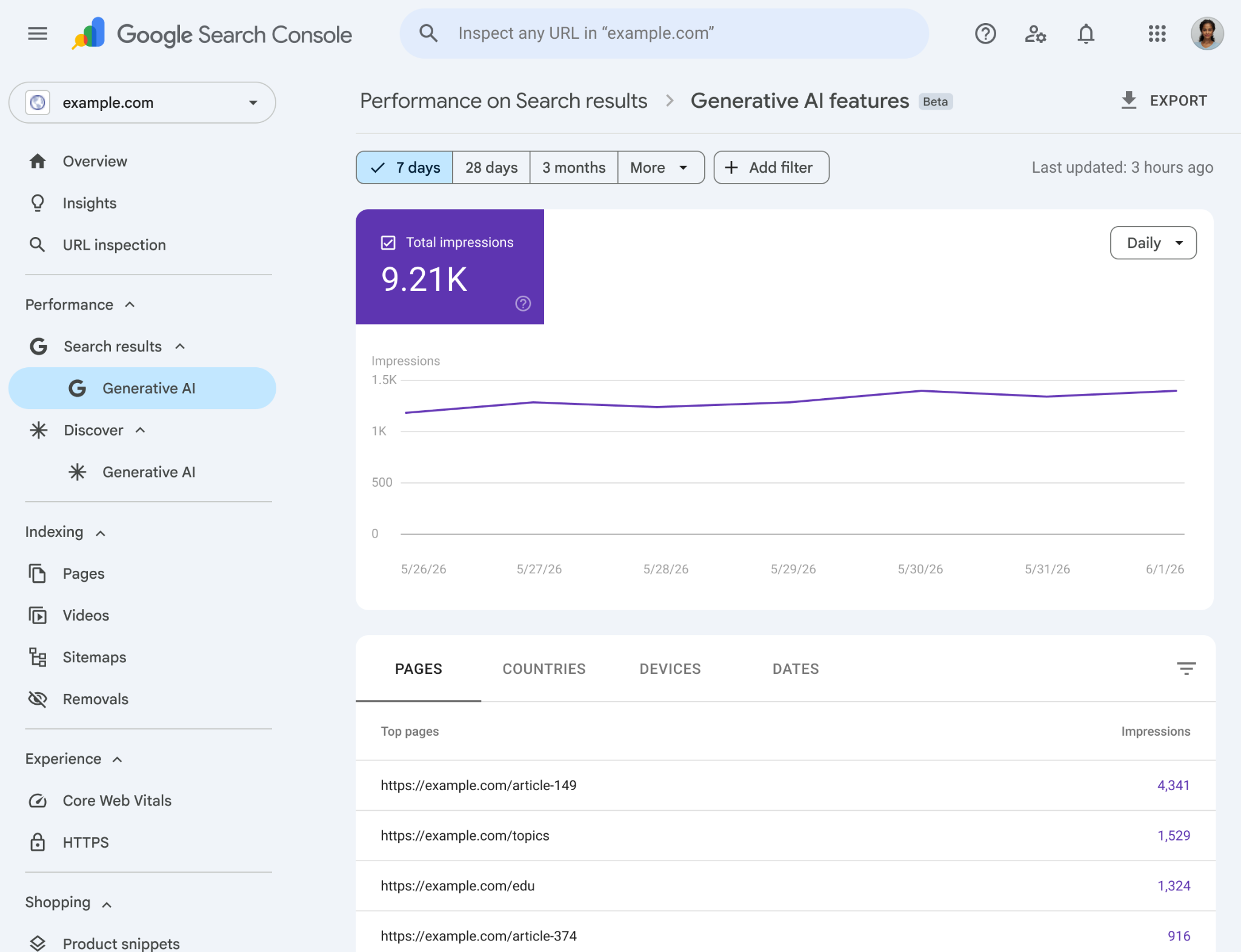
Two things before you open Search Console:
- It's rolling out gradually — a small group of sites first, starting in the UK. You probably won't see it yet. You also need enough AI-feature impressions, and your site must be included (not excluded) in Google's AI features.
- Impressions only, no clicks (for now). No CTR, no traffic — today the report shows pure visibility.
You can segment by pages, countries, devices and dates (Pacific Time; the newest daily data can still be preliminary).
Side note: Google shipped an opt-out toggle alongside this. Pull it and you no longer appear in AI features — so you get no impressions from them either. The wrong lever for most, but good to know it exists.
For Bing, this is already live
What's just starting at Google has been live in Bing Webmaster Tools since February 10, 2026: AI Performance shows how often your pages are cited in Microsoft Copilot and Bing's AI answers.
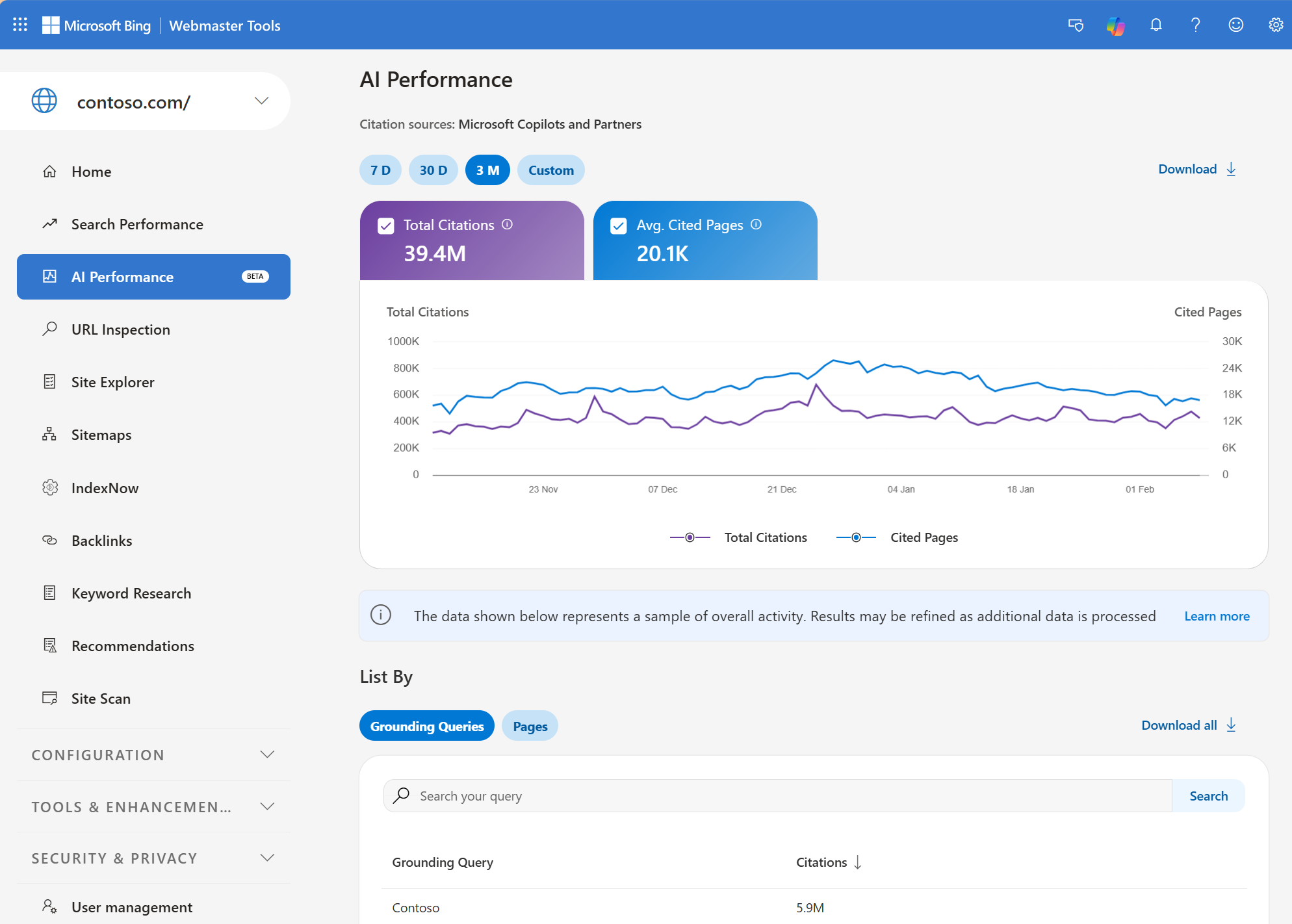
And — this is the underrated part — including the grounding queries: the search phrases the AI actually used to find and cite your content. Concretely, you get:
- Total Citations — how often your content appears as a source in AI answers overall
- Average Cited Pages — how many unique pages get cited per day
- Grounding Queries — the phrases the AI used to pull your content
- Citation activity per URL — which pages get cited, trended over time
One caveat: the data is a sample of overall citation activity, not a complete count. Even so, it's the first thing that gets closer to "real user behavior" than anything before it. Underrated for B2B — where buyers sit inside Microsoft tools all day.
And this isn't theoretical: for one client we 10×'d their AI Performance according to Bing — today they get roughly as many leads from Bing as from Google. In B2B, Bing is still very much relevant.
How to approach it
No new tool, no setup marathon. The order:
- Turn on Bing first. Open Webmaster Tools → AI Performance. It's there today and gives you the most interesting data point via grounding queries: the real questions you're being cited for.
- Check whether the AI report has rolled out in Search Console. Probably not yet — so make sure the property is verified and that you're not excluded from AI features, so you start collecting data the moment it goes live.
- Hold grounding queries against your prompt list. This is where it gets interesting: compare the questions you're actually cited for with the prompts you invented for your GEO tracking. The gap between them is your to-do list.
- Prioritize the cited pages. Which URLs is the AI pulling? Expand exactly those, structure them cleanly, keep them current — that's your existing lever, now backed by data instead of guesswork.
Why this is more than a new column in your dashboard
For the first time, you can work on your AI visibility and verify it against actual user behavior — not a self-selected sample.
Prompt-based tracking stays useful: it's the only way to look right now into ChatGPT, Claude & Co., which have no Search-Console equivalent yet. But from here on you have a ground-truth layer next to it for Google and Microsoft. Proxy plus reality, instead of proxy alone.
Why your own tracking stays indispensable
Don't get me wrong: Search Console and Bing are a leap forward. But they have blind spots that matter for growth.
- They only show Google and Microsoft. ChatGPT, Claude, Perplexity & Co. appear in neither report — and that's exactly where a growing share of buying research happens.
- They show that you're cited — not how. Were you named as a recommendation or as a cautionary example? In what context, next to which competitors, with what sentiment? An impression tells you none of that.
- They show no competition. You see your own numbers, but not who's taking citations from you and for which topics.
That's exactly why we built our own tracking tool at Fento AI. The existing solutions weren't enough for us to actually hack growth through AI visibility — they measure mentions, but they don't close the loop to "what do we do differently tomorrow." We track across every relevant AI engine, break it down by sentiment, context and competitors, and merge it with the real numbers from Search Console and Bing. Proxy and ground truth, in one place, translated into concrete action.
Which leaves the question of whether — and when — something similar will show up for ChatGPT, Claude & Co.
Sources: Google: Generative AI performance reports in Search Console · Google Search Console Help · Bing: AI Performance in Bing Webmaster Tools