Right now, as you read this, an AI bot is probably reading your website. And your Google Analytics will never show it.
Because "AI bot" isn't one thing. Three very different visitors show up, with completely different intentions. Most people see the names in their server logs for the first time and google them literally: What is ClaudeBot? What is ChatGPT-User doing on my site? Here's the breakdown, bot by bot.
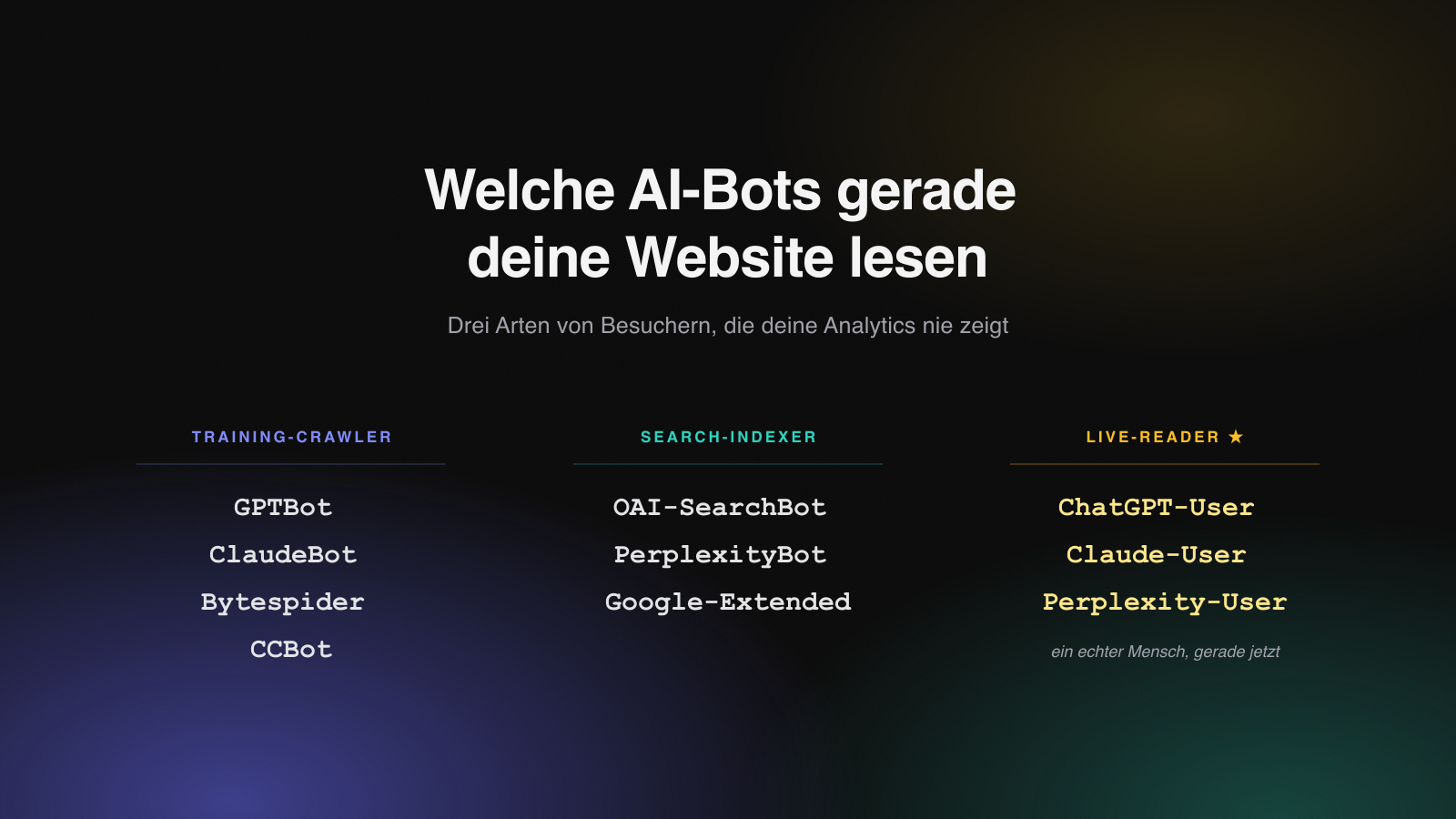
The three kinds of AI bots
1. Training crawlers: GPTBot and ClaudeBot
GPTBot (OpenAI) and ClaudeBot (Anthropic) collect data to train future models. They decide what a model will later know about you, your brand, and your product. Block these crawlers and you disappear from the world knowledge of the next model generation.
This is the long-term layer: no immediate effect, but it shapes how AI describes you months from now.
2. Search indexers: OAI-SearchBot and PerplexityBot
OAI-SearchBot (OpenAI) and PerplexityBot (Perplexity) build the index that AI search pulls its answers from. It's the equivalent of the classic Googlebot, just for the new generation of answer engines. If you're not in this index, you don't show up in AI search results.
3. Live readers: ChatGPT-User, Claude-User and Perplexity-User
This is the most interesting category. ChatGPT-User, Claude-User and Perplexity-User mean: a real person just asked the AI a question, and it's loading your page at this very moment to answer.
This is not an anonymous crawler. This is a buyer making a decision right now, and the AI is pulling your page as the basis for its answer. Live reads are not a future thing. They're happening now.
Why your analytics doesn't show this
Google Analytics and most tracking tools run on JavaScript in the browser. AI bots don't execute that JavaScript, they fetch the raw HTML. The result: your entire AI traffic is invisible in standard analytics. A blind spot that grows every month.
It only becomes visible server-side, where every request arrives before any script runs. That's exactly where you hook in.
AI bots at a glance
| Bot (user agent) | Operator | Category | What it does |
|---|---|---|---|
| GPTBot | OpenAI | Training crawler | Collects training data for future models |
| ClaudeBot | Anthropic | Training crawler | Collects training data for Claude |
| OAI-SearchBot | OpenAI | Search indexer | Builds the index for ChatGPT search |
| PerplexityBot | Perplexity | Search indexer | Builds the index for Perplexity |
| ChatGPT-User | OpenAI | Live reader | Loads your page live for a user's answer |
| Claude-User | Anthropic | Live reader | Loads your page live for a user's answer |
| Perplexity-User | Perplexity | Live reader | Loads your page live for a user's answer |
| Bytespider | ByteDance | Training crawler | Collects data, often very aggressively |
| Google-Extended | Training crawler | Controls usage for Gemini training |
How to track AI bots yourself
You don't need an enterprise tool for this. All it takes is:
- Around 50 lines of server-side middleware that checks every request against known AI user agents (GPTBot, ClaudeBot, ChatGPT-User and so on).
- A free PostHog dashboard that breaks the hits down by bot name, page and time.
The key point: this has to run server-side, at the first layer that sees the request. Here's a concrete version for Next.js (App Router). The principle is the same everywhere: check the user agent against a list of known bots, fire an event to PostHog on a match, and let the request continue as normal.
// proxy.ts (Next.js App Router). In Express, Cloudflare Workers or PHP
// it's the same principle at the first server-side layer.
import { NextResponse, type NextRequest, type NextFetchEvent } from "next/server";

const POSTHOG_KEY = process.env.NEXT_PUBLIC_POSTHOG_PROJECT_TOKEN;
const POSTHOG_HOST = "https://eu.i.posthog.com"; // US: https://us.i.posthog.com

// Known AI bots. Order matters: specific user bots before crawlers.
const AI_BOTS: ReadonlyArray<{ pattern: RegExp; name: string }> = [
  // Live readers: a real human is asking the AI right now
  { pattern: /ChatGPT-User/i, name: "ChatGPT-User" },
  { pattern: /Claude-User/i, name: "Claude-User" },
  { pattern: /Perplexity-User/i, name: "Perplexity-User" },
  // Search indexers
  { pattern: /OAI-SearchBot/i, name: "OAI-SearchBot" },
  { pattern: /PerplexityBot/i, name: "PerplexityBot" },
  { pattern: /Google-Extended/i, name: "Google-Extended" },
  // Training crawlers
  { pattern: /GPTBot/i, name: "GPTBot" },
  { pattern: /ClaudeBot/i, name: "ClaudeBot" },
  { pattern: /Bytespider/i, name: "Bytespider" },
  { pattern: /CCBot/i, name: "CCBot" },
];

function matchBot(ua: string): string | null {
  for (const { pattern, name } of AI_BOTS) if (pattern.test(ua)) return name;
  return null;
}

export default function proxy(request: NextRequest, event: NextFetchEvent) {
  const ua = request.headers.get("user-agent") ?? "";
  const bot = matchBot(ua);

  if (bot && POSTHOG_KEY) {
    const url = request.nextUrl;
    // Fire-and-forget: the response goes out immediately, the POST runs
    // in the background. A slow PostHog can never delay the request.
    event.waitUntil(
      fetch(`${POSTHOG_HOST}/i/v0/e/`, {
        method: "POST",
        headers: { "content-type": "application/json" },
        body: JSON.stringify({
          api_key: POSTHOG_KEY,
          event: "bot_crawl",
          distinct_id: bot,
          properties: {
            $process_person_profile: false, // no person profile, no pollution
            bot,
            path: url.pathname,
            host: url.host,
            user_agent: ua,
          },
        }),
      }).catch(() => {}),
    );
  }

  return NextResponse.next(); // request continues as normal
}

export const config = {
  // Exclude assets, but let llms.txt / sitemap.xml / robots.txt through.
  matcher: ["/((?!api|_next|_vercel|.*\\.(?:png|jpe?g|gif|svg|webp|ico|css|js|woff2?)$).*)"],
};
Three details that make the difference:
$process_person_profile: false. Bots aren't people. Without this flag you dilute your real user numbers with crawler traffic.event.waitUntilinstead ofawait. The bot request must never wait for PostHog to respond. Fire and forget.- The matcher has to let
llms.txtthrough. Otherwise you miss the exact file that exists specifically for AI bots.
Do you really need a hardcoded list?
Short answer: there's no true auto-detection. There's always a list somewhere: the only question is who maintains it. A request carries nothing but the user-agent string; there's no "I am an AI bot" flag, and heuristics like "runs no JavaScript" also match plenty of legitimate HTTP clients.
So you have three options, from "maintain it yourself" to "let someone else":
- Your own regex list (the code above). About ten lines, full control. You add new bots yourself, which for the big, stable names (GPTBot, ClaudeBot, ChatGPT-User) is a non-issue.
- A maintained dataset instead of your own array:
isbot, thecrawler-user-agentslist, or theai-robots-txtlist (updated monthly). Swap theAI_BOTSarray for an import and you never edit it again. - Let the platform do it. Cloudflare has "Verified Bots" and a dedicated AI-bot category: automatic detection plus real verification. Vercel has bot detection too.
One caveat that often gets missed: the user agent is spoofable. Anyone can claim to be GPTBot. It's only truly reliable via IP-range checks (OpenAI and Anthropic publish their ranges) or reverse DNS, which is exactly what Cloudflare's "Verified" does automatically. For a dashboard that shows trends, the UA match is plenty. For "block anything that can't verify itself," you need the IP check.
When I set this up for a client, ChatGPT-User pulled their homepage within minutes of deploying. The visits are already happening. The only question is whether you see them.
And if you don't just want to see who's reading but want to be recommended in those AI answers: that's exactly what I work on with B2B companies, as a GEO agency for Munich, Berlin and Zurich.